Attendance Reliability
Look at attendance against expected working time and days. Check the underlying records and agreed arrangements before deciding what a change means.
THE ATTENDANCE CULTURE MODULE
Attendance Culture turns attendance records into a clearer starting point for fair conversations. Eight components and 21 metrics help you explore patterns across the company, departments and employees. Four zones highlight where to recognise reliability, keep an eye on change or offer support. Employees can see their own result, so everyone works from the same picture. The value comes from reading the records with people, context and shared expectations in mind.
Attendance Culture brings related measures together into eight components. This makes it easier to discuss the area that needs attention rather than treating one overall score as the whole story. Each component helps separate concerns that might otherwise get mixed together.
Look at attendance against expected working time and days. Check the underlying records and agreed arrangements before deciding what a change means.
Consider late arrivals and early departures. Discuss the timing, frequency and practical causes alongside the expectations people were given.
Review recorded absence patterns and how they were categorised. Resolve missing approvals or incorrect records before interpreting a result.
Understand recorded leave in context. Approved leave and illness need careful interpretation; taking legitimate leave is not evidence of poor commitment.
Notice sustained overtime or unusual working patterns. Use these as prompts to review workload, cover and recovery time, rather than diagnosing fatigue.
Compare recorded attendance with the relevant roster or shift. Check for changed shifts, swaps and outdated schedules before raising a concern.
Look for gaps, missed clockings and manual corrections. Poor records call for a data check, not an assumption about someone’s behaviour.
Notice dependable attendance habits and responsible improvement. Recognition should support reliability without encouraging people to work when unwell.
Components organise the evidence. They do not explain an employee’s circumstances or replace a manager’s responsibility to listen.
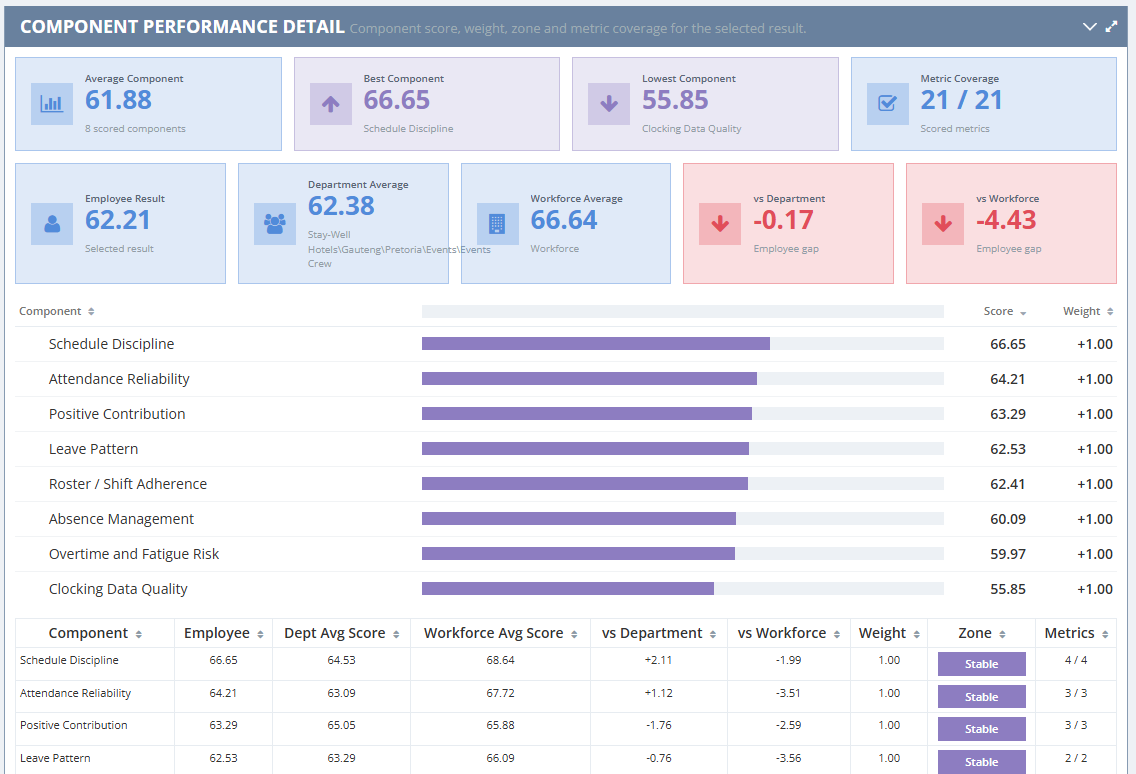
The standard metric library covers hours, days, punctuality, absence, leave, overtime and record quality. A metric is a measurement, not a finding about intent. The configured set determines the active measures, weights, data requirements and zone rules.
For example, late arrival minutes and late arrival count answer different questions: duration and frequency. Neither explains transport disruption, a changed start time or an incorrect entry. Check the source and ask what happened.
A score depends on the configured rules. Do not assume that a higher raw value is always better, or compare results produced under different settings without checking those settings.
Perfect attendance days is measured as one indicator among many; it should not be rewarded on its own.
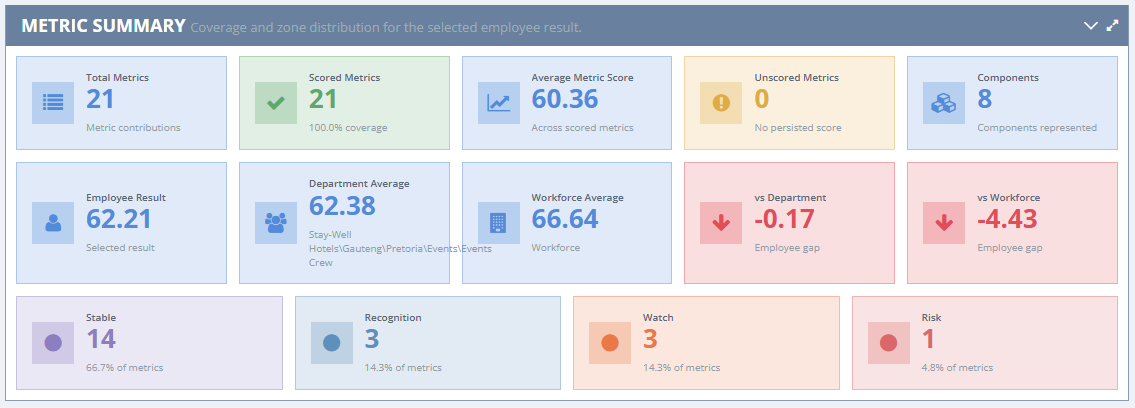
The four dashboard zones make patterns easier to spot. Read the name as well as the colour, and look beneath the overall result at the component and metric detail.
Patterns within the configured stable range. Keep checking context and supporting dependable habits.
A prompt to acknowledge contribution or improvement, while respecting legitimate time away.
A prompt to check an emerging pattern and offer an early, private conversation.
A prompt for closer review and timely support. Check the records and hear the person’s explanation.
A Risk result is not a disciplinary finding. A Recognition result is not proof that someone never needs support. No zone should become a public label attached to an employee.
Start with the organisation-wide picture. Review the distribution of results and movement across completed periods. Use this overview to identify where a closer look would help, rather than ranking teams without context.
Look at the team’s components, employee distribution and changes over time. Consider shift patterns, job demands, team size and the records available. A department handling night shifts should not be compared casually with an office team.
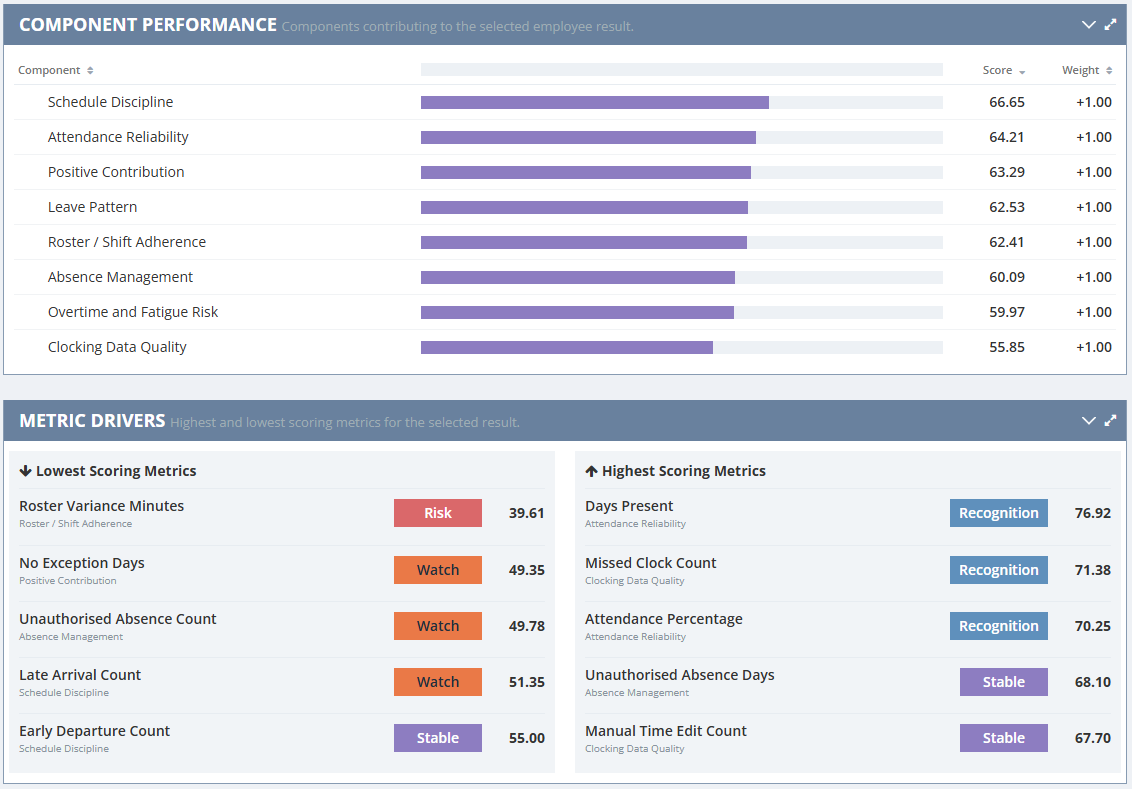
Explore an individual result, its component breakdown and metric drivers. Prepare questions for a private conversation and give the person a chance to explain or correct the records. Employees can see their own result too, through BioSyn Employee Self Service, so everyone works from the same picture.
Select the relevant period and compare it with earlier completed periods. Check whether results are final and whether the underlying data is sufficiently complete. An isolated change and a repeated pattern may call for different responses.
Review improvement as carefully as deterioration. Changes in rosters, rules or record quality can affect comparability. Agree a follow-up date and check whether the practical support made a difference.
Depending on the implementation and available sources, the picture can draw on time and attendance records, clocking data, rosters, leave information and relevant access control data. Confirm which sources are actually connected and what each record represents.
A site-entry event does not automatically establish a shift start, productive work or the reason someone was absent. Check site access arrangements, missing events and agreed working hours before drawing conclusions.
Correct obvious gaps and classification errors first. Keep authorised changes traceable and explain how a person can raise an error. A low-confidence record is a reason to improve the evidence before acting on it.
Explain what is collected, why it is used and who may see it. Keep access appropriate to each person’s role, use information relevant to the stated purpose, and set retention and security arrangements that reflect the organisation’s obligations.
Attendance information can reveal personal circumstances. Keep health details and private explanations out of shared dashboards and public discussions. Use aggregate views where they meet the purpose, and discuss individual concerns privately.
Under POPIA, organisations need an appropriate basis and safeguards for processing personal information. Review the actual setup, including any biometric information at source, against current requirements. Technology supports the conversation; it cannot supply empathy, explain every cause or make a fair employment decision on its own.
No. It describes a configured result. The explanation needs accurate records, context and a respectful conversation.
Yes. Employees can view their own score, zone, components and trend through BioSyn Employee Self Service, so they see the same picture their manager does.
No. The website examples use demo data. Names and figures are fictional and illustrate the views.
Only with care. Check the period, rules, data completeness, shifts and working conditions before interpreting differences.
No. Clear expectations, consistent leadership, private conversations and appropriate support remain essential.
General information, not legal advice. Check current South African legislation and obtain qualified advice for privacy arrangements or employment decisions. See the Information Regulator’s POPIA guidance.
Take the Self-Assessment Book a Demo
Attendance Culture is a BioSyn module.
Published by the BioSyn team · Last updated: 20 October 2026